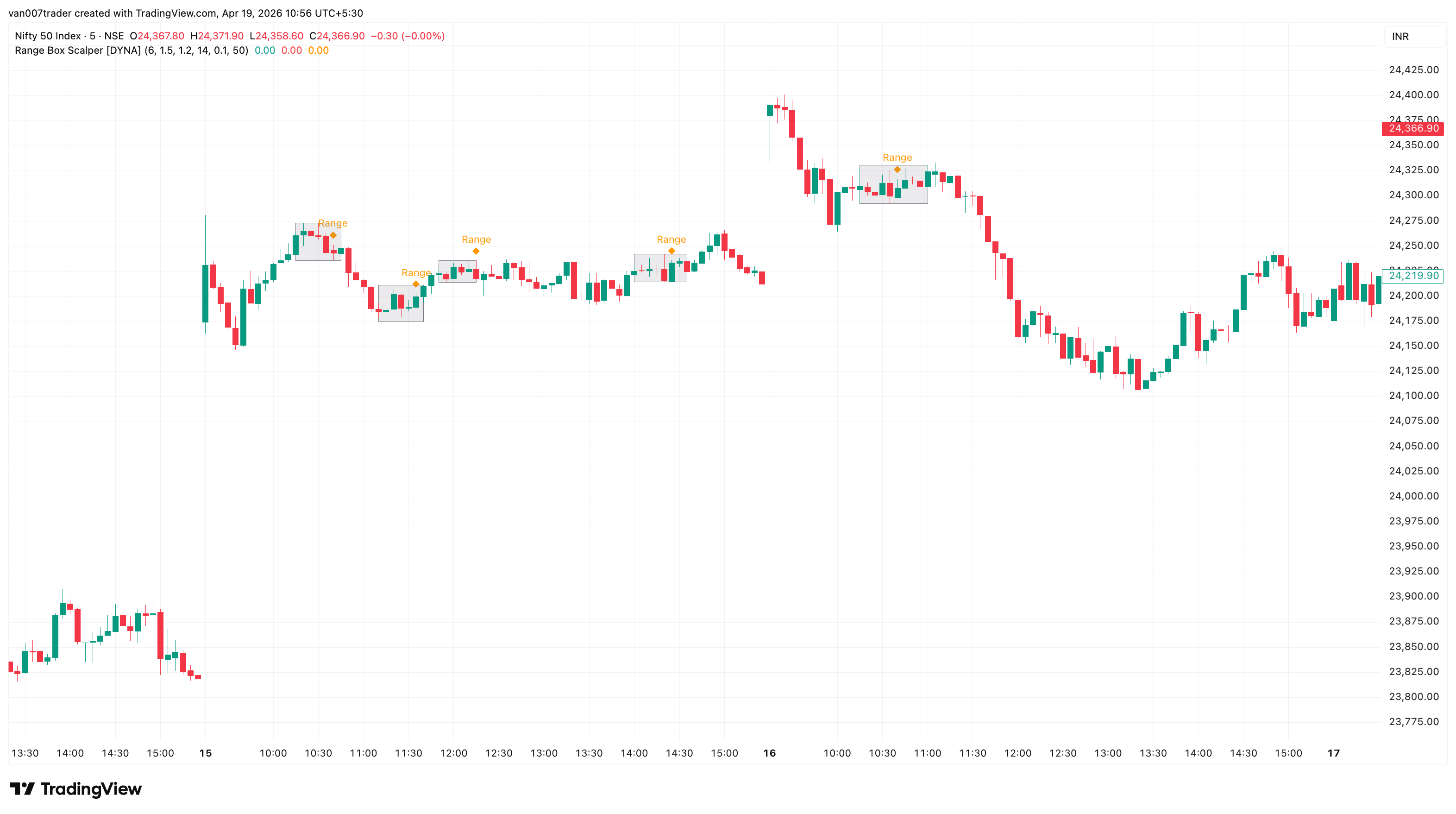
Range Box Scalper detects when price compresses into a tight consolidation zone and visually draws a box around it in real time. When price breaks out of the box with above-average volume, the indicator marks the exact breakout bar with a directional arrow, so you can act on the expansion move without second-guessing the setup.
Most traders know that consolidation leads to expansion, but spotting the range in real time and confirming the breakout with volume is tedious manual work. Range Box Scalper automates the entire process: it watches for price to stay within an ATR-defined corridor for a minimum number of bars, draws the consolidation zone as a visible box on the chart, and then waits for a decisive close outside the box backed by strong volume before signaling the breakout.
Key Features
- Automatic Range Detection — Identifies consolidation zones based on ATR-calibrated price width and minimum bar count. No manual drawing required.
- Live Box Drawing — Shaded boxes appear and extend in real time as price continues to range, giving you a clear visual boundary to watch.
- Volume-Confirmed Breakouts — Breakout arrows only appear when volume exceeds a configurable multiple of the 20-bar average, filtering out weak, low-conviction exits.
- Breakout Strength Filter — Requires the breakout candle to close a minimum distance (ATR-based) beyond the range boundary, eliminating marginal breakouts.
- Built-in Trend Filter — Optional EMA-based trend filter ensures breakouts only fire in the direction of the prevailing trend, so you can focus on with-trend setups.
- Directional Breakout Arrows — Green upward triangles for bullish breakouts, red downward triangles for bearish breakouts, placed right at the breakout bar.
- No Repainting — All signals use confirmed-bar logic. Once a box or arrow appears, it stays.
How It Works
As price action unfolds, Range Box Scalper continuously monitors whether recent bars are staying within a narrow corridor. The corridor width is derived from ATR, so it automatically adapts to the volatility of whatever instrument you are trading. When price stays inside this corridor for your configured minimum number of bars, a shaded gray box appears on the chart marking the consolidation zone. You will also see a small orange diamond labeled "Range" on the bar where the consolidation is first confirmed.
The box continues to extend to the right as long as price remains inside the boundaries. The moment price closes decisively outside the box and the breakout bar carries above-average volume, the indicator marks the breakout with a colored arrow: a green triangle below the bar for a bullish breakout, or a red triangle above the bar for a bearish breakout. The box border also changes color to match the breakout direction, giving you a quick historical reference for which zones broke which way.
If price drifts out of the range on weak volume, no breakout signal fires. The indicator simply resets and begins looking for the next consolidation. This volume filter is what separates genuine expansion moves from false exits that quickly reverse.
Settings
The core settings control how the indicator defines a consolidation zone. Min Range Bars (default: 6) sets how long price must stay compressed before a box is drawn — lower values on fast timeframes, higher values on daily charts. ATR Multiplier (default: 1.5) controls the maximum allowed range width relative to ATR; lower values mean tighter, more compressed boxes, while higher values detect more consolidation zones. Volume Confirmation (default: 1.2x) sets the volume threshold for breakout signals; increase this if you want only the strongest breakouts.
Min Breakout Strength (default: 0.1x ATR) requires the breakout candle to close at least this distance beyond the range boundary, filtering out marginal breakouts that barely clear the box edge. The Trend Filter (default: off, EMA 50) optionally restricts breakouts to the trend direction — bullish breakouts only fire above the EMA, bearish breakouts only below. Enable this if you want to filter counter-trend setups.
Visual toggles let you show or hide the consolidation boxes and breakout arrows independently. Each alert type can also be toggled on or off.
Alerts
- Consolidation Forming — Fires when price has ranged for the minimum number of bars and a new consolidation zone is confirmed. "Range Box Scalper: Consolidation zone detected. Price is ranging in a tight range."
- Breakout Up — Fires when price closes above the consolidation box with volume confirmation. "Range Box Scalper: Bullish breakout from consolidation zone with volume confirmation."
- Breakout Down — Fires when price closes below the consolidation box with volume confirmation. "Range Box Scalper: Bearish breakout from consolidation zone with volume confirmation."
To set up alerts: click the TradingView Alerts button, select "Range Box Scalper [DYNA]" from the indicator dropdown, choose "Any alert() function call" as the condition, and set your preferred notification method.
Best Practices
- On lower timeframes (1m-5m), reduce Min Range Bars to 5-6 to catch shorter consolidation periods that match the faster price action.
- On higher timeframes (4H and above), increase Min Range Bars to 12-15 so only significant consolidation zones are flagged.
- Increase the Volume Confirmation multiplier or Min Breakout Strength if you are getting too many signals — this ensures only the strongest breakouts are marked.
- The built-in trend filter (EMA 50) ensures breakouts align with the prevailing trend. Disable it if you want to trade counter-trend setups.
- After a breakout, the box boundaries (top and bottom) often act as support or resistance on a retest.
Part of the DYNA Ecosystem
Range Box Scalper is a free indicator built with the same design standards as the DYNA premium suite. For complete trade management with automatic stop loss, break-even, trailing stops, and multi-target systems, explore the full DYNA indicator collection.
Disclaimer
This indicator is a technical analysis and educational tool only — it is not financial advice and makes no guarantee of any outcome. Past performance does not predict future results. Always do your own research and use proper position sizing and risk management.