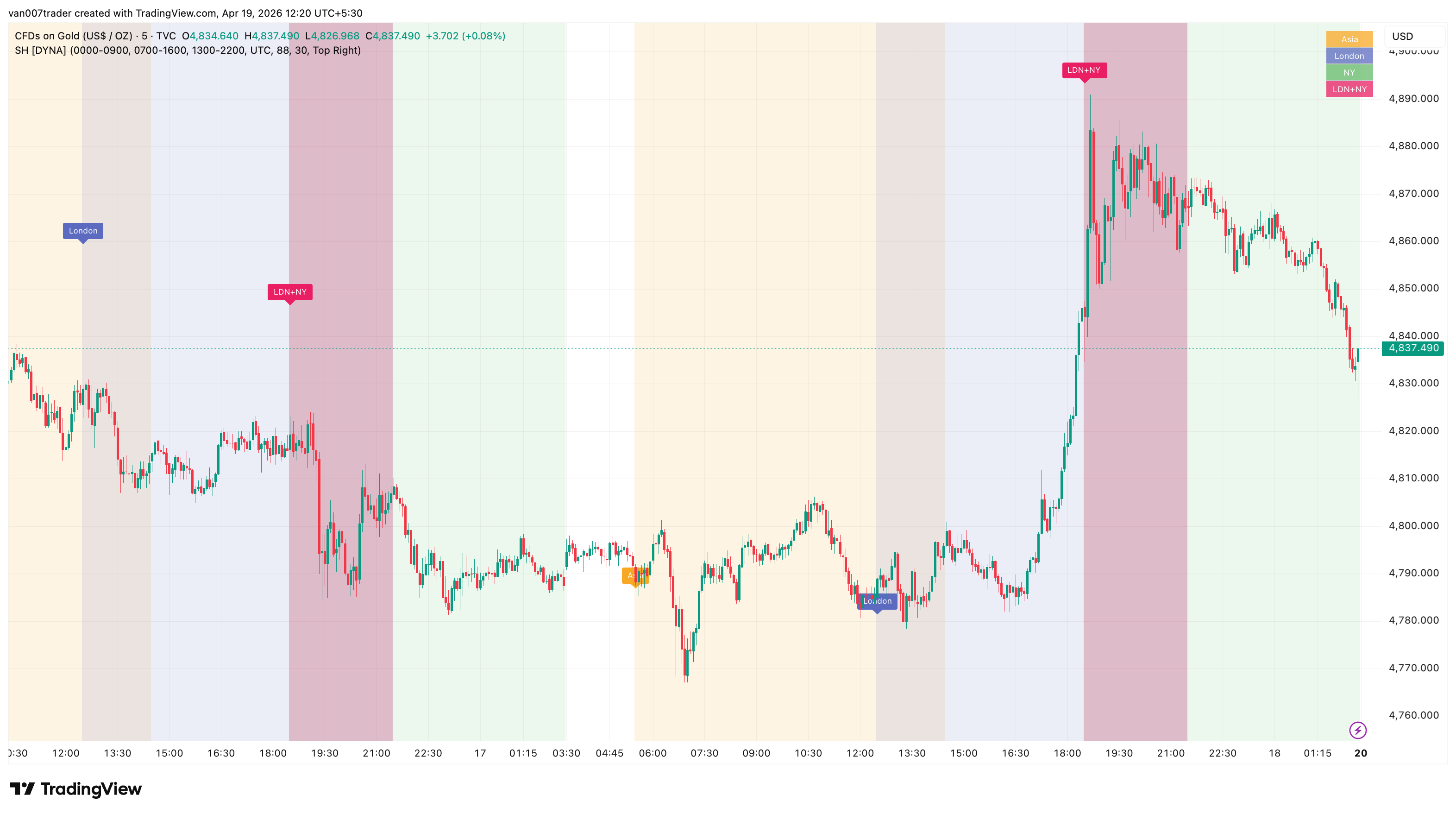
Session Highlighter color-codes the chart background by the three major global trading sessions — Asia (Tokyo), London, and New York — so the active session is obvious at a glance and the handovers between them are unmistakable. A separate overlap band highlights the 13:00-16:00 UTC window when London and New York are simultaneously open, the most volatile FX period of the day. Each session-open is also marked with a small color-coded label above the first bar of the session.
Sessions are configured as free-text time windows interpreted in a user-selected timezone. Default windows match the standard FX session calendar in UTC, but every value — session times, colors, transparency, alerts — is editable. The indicator works identically on forex, crypto, futures, and any intraday equity chart that overlaps with one or more global sessions.
Key Features
- Three Configurable Sessions — Asia, London, and New York windows with independent colors, toggles, and timing. Free-text session strings let you customize each window without code edits.
- London-NY Overlap Highlight — A dedicated overlap band marks the bars where London and NY are simultaneously open — commonly the most active FX window of the day.
- Editable Timezone — Interpret all three sessions in UTC (default), New York, London, Tokyo, Sydney, or any other major financial center.
- Session-Open Labels — A small label appears above the bar that opens each session, with a configurable history limit so the chart never gets cluttered.
- Color-Coded Legend — Optional corner table maps each band color to its session (Asia, London, NY, LDN+NY) so the chart is always self-explanatory, even before the next session opens.
- Per-Session Alerts — Fire alerts independently for Asia open, London open, NY open, and the London-NY overlap start.
- Theme-Aware Transparency — Single transparency input controls all session bands together. Tune for bright or dark chart themes.
- No Repainting — Session detection is purely time-based and stable across reloads. Bands and labels never move.
How It Works
For each bar, the indicator checks whether the bar's timestamp (interpreted in the configured timezone) falls inside the Asia, London, and New York session windows. If a bar is inside a session, the chart background for that bar is tinted with the session's color. If a bar is inside both London and New York, an additional overlap tint is layered on top, rendered slightly less transparent than the individual session bands so it stands out from the underlying London and NY layers.
Session opens are detected with a daily-anchor timestamp comparison rather than a simple "previous bar was outside the session" check. This is important because most TradingView intraday charts hide off-hours bars by default, so a naive previous-bar test would only fire on the very first chart load. The anchor-comparison method works reliably whether the chart includes off-hours bars or not.
When a new session opens, the indicator places a small color-coded label (Asia, London, NY, or LDN+NY) above the first bar of the session. The overlap label reads LDN+NY rather than a generic "Overlap" so the two source sessions are always explicit. Old labels are deleted automatically once the chart has more than the configured maximum, so the visual stays clean even on very long histories.
Settings
The three session strings are entered in TradingView's standard HHMM-HHMM session format and accept the optional day-of-week mask (e.g. 0700-1600:23456 to limit London to weekdays only). All three windows are interpreted in the same Timezone, which defaults to UTC. Switch the timezone dropdown if you prefer to express the sessions in local exchange time — the indicator will then anchor the session boundaries to that timezone, including DST handling.
The visual block exposes per-session show toggles, per-session color pickers, the London-NY Overlap toggle and color, a single Background Transparency input (default 88), the Show Session Labels toggle, a Max Labels to Keep limit (default 30), the Show Legend Table toggle, and a Legend Position dropdown that anchors the legend in any chart corner. The overlap band is rendered with 10 less transparency than the configured value so it remains visible when stacked on top of the London and NY bands.
The alerts block exposes one toggle per event so you can enable only the alerts you care about.
Alerts
- Asia Session Open — Fires on the first bar of the Asia session each day. "Session Highlighter [DYNA]: Asia (Tokyo) session has opened."
- London Session Open — Fires on the first bar of the London session each day. "Session Highlighter [DYNA]: London session has opened."
- NY Session Open — Fires on the first bar of the New York session each day. "Session Highlighter [DYNA]: New York session has opened."
- London-NY Overlap Start — Fires on the first bar where London and NY are both open. "Session Highlighter [DYNA]: London-New York overlap window has started."
To set up an alert: open TradingView's Alerts panel, choose "Session Highlighter [DYNA]" from the condition dropdown, pick the event you want, and select your notification channel.
Best Practices
- Keep the timezone on UTC unless you have a specific reason to change it. UTC eliminates DST drift and matches how institutional desks reference session windows.
- On dark chart themes, lower the background transparency to 80-85 for stronger session colors. On light themes, push it up to 90-95 so the bands stay readable.
- The London-NY overlap is typically among the most active FX windows of the day. Ranges are often larger during this band, so consider your risk parameters accordingly.
- On markets that only trade inside one session (e.g. many regional equity exchanges overlap with just the Asian or early-London window), turn off the irrelevant session bands to reduce clutter.
- If your broker uses a non-standard session window, just edit the session string — the indicator picks up the change immediately, including the overlap.
- Use the day-of-week mask (e.g. 0700-1600:23456) to suppress weekend session bands on forex charts.
Part of the DYNA Ecosystem
Session Highlighter is a free indicator built with the same design standards as the DYNA premium suite. For complete trade management with automatic stop loss, break-even, trailing stops, and multi-target systems, explore the full DYNA indicator collection.
Disclaimer
This indicator is a technical analysis and educational tool only — it is not financial advice and makes no guarantee of any outcome. Past performance does not predict future results. Always do your own research and use proper position sizing and risk management.