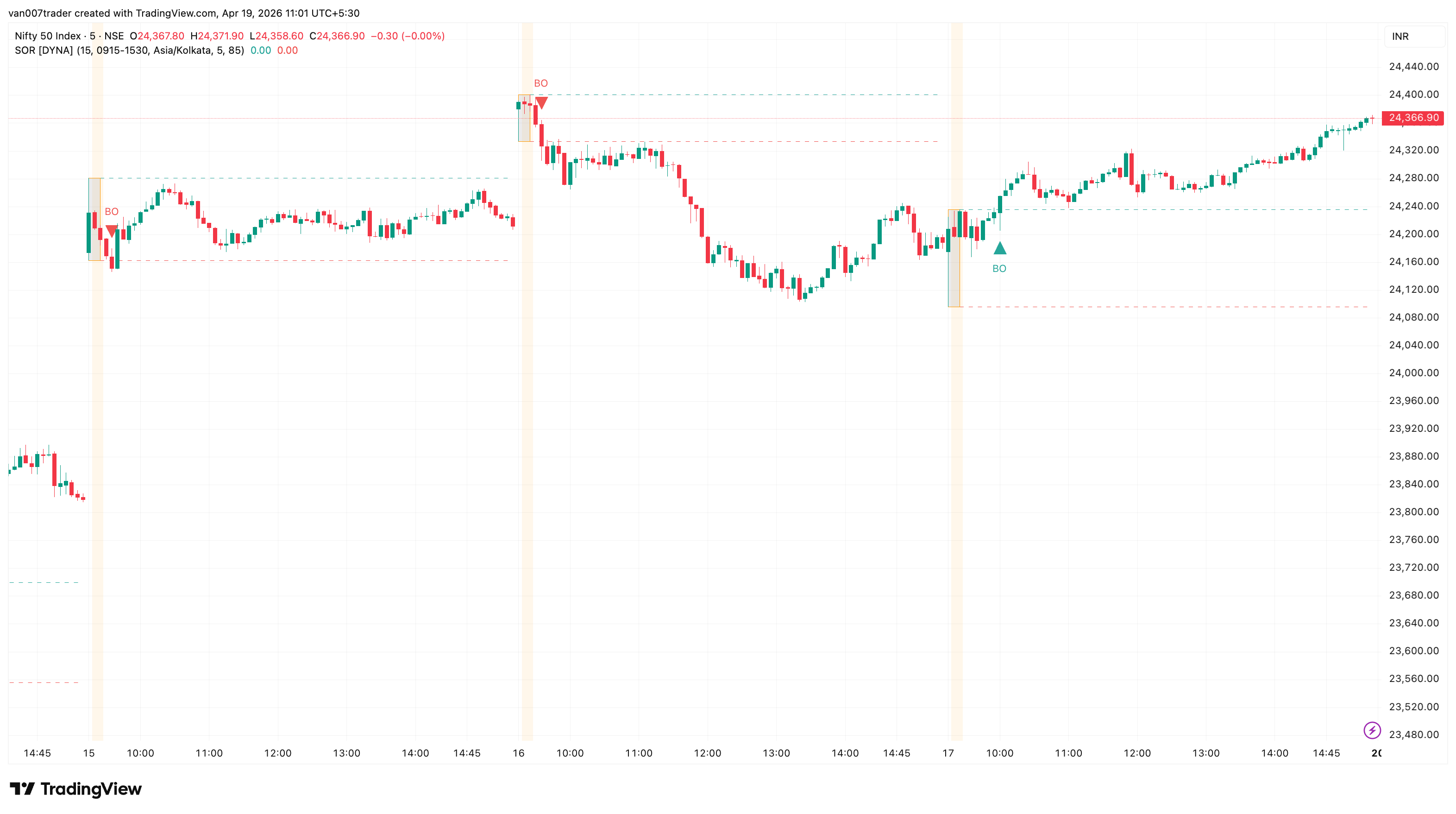
Session Open Range captures the high and low of the first few minutes of every trading session and tracks breakouts from that range for the rest of the day. The opening range is the session's initial balance: once it is set, the first decisive break above or below the range is a structural reference many traders watch for the day's directional bias. This indicator draws the opening range as a box, extends the high and low as dashed lines through the session, and marks the first breakout in each direction with a triangle.
Most ORB tools are hardcoded to a single exchange. Session Open Range is configurable end-to-end: pick any session window, any timezone, any OR duration. It works identically on a stock or index cash session, on NYSE 9:30--16:00 ET, on a London or Tokyo forex session, or on a custom 24h UTC-anchored crypto session. Only the first breakout in each direction fires per session, so you get one clean bullish signal and one clean bearish signal — no noise from re-crosses.
Key Features
- Any Session, Any Timezone — Uses TradingView's native session picker plus a timezone dropdown so the same indicator works across global markets without code edits.
- Configurable OR Duration — Opening range length is a free-text minute input. Scalpers can use 5 minutes, swing-oriented intraday traders 30 or 60.
- Live OR Box — The box forms bar-by-bar during the formation window, then freezes when the OR locks. A subtle background tint highlights the formation bars.
- Dashed Extension Lines — The OR high (green) and OR low (red) extend through the session as dashed horizontal levels, so you always know where price is relative to the initial balance.
- First-Breakout Markers — A green triangle marks the first bar that closes above the OR high; a red triangle marks the first close below the OR low. One per direction per session.
- Multi-Session History — Keep the last N sessions of boxes and lines on the chart to study how price reacts to recent opening ranges.
- No Repainting — All state transitions and signals are gated on confirmed bars. Arrows never move after they appear.
How It Works
At the start of each session (determined by your session window and timezone), the indicator begins tracking the high and low of every bar. During the formation window — the first N minutes of the session — the opening range box expands as each new bar's high or low extends the range. A light orange background tint marks the bars that are still inside the formation window so you can see it forming in real time.
When the formation window closes, the OR is locked: the box border changes to orange, and the OR high and OR low are extended forward as dashed horizontal lines (green for the high, red for the low). The indicator then watches every subsequent bar in the session. The first bar whose close breaks above the OR high gets a green triangle below it labeled "BO". The first bar whose close breaks below the OR low gets a red triangle above it labeled "BO". Only one arrow fires in each direction per session — subsequent re-crosses are intentionally ignored, because only the first break of the initial balance carries structural significance.
When the session ends and a new one begins, the entire cycle resets. Older sessions are kept on the chart up to the configured history limit, then deleted automatically to prevent clutter.
Settings
Opening Range Period (min) (default: 15) defines how many minutes from session open are used to build the opening range. Common choices are 5 for scalpers, 15 for intraday traders, 30 or 60 for swing-oriented day traders. Session Time (default: 0915-1530) is the trading session window; the TradingView session picker supports day-of-week masks for instruments that do not trade every day. Timezone (default: Asia/Kolkata) interprets the session string — match the exchange's local time to avoid DST errors.
Max Sessions to Keep (default: 5) limits how many past sessions of boxes and extension lines are kept on the chart. Older drawings are deleted automatically, so the script stays within TradingView's drawing object budget even on long histories.
Visual toggles let you independently show or hide the OR box, the extension lines, the breakout arrows, and the formation-window tint. Box Fill Transparency (default: 85) controls how see-through the box fill is. The two alert toggles enable or disable the bullish and bearish breakout alerts individually.
Alerts
- Bullish Breakout — Fires the first time price closes above the OR high in a given session. "Session Open Range [DYNA]: Bullish breakout above opening range high."
- Bearish Breakout — Fires the first time price closes below the OR low in a given session. "Session Open Range [DYNA]: Bearish breakout below opening range low."
To set up alerts: click TradingView's Alerts button, choose "Session Open Range [DYNA]" from the condition dropdown, pick Bullish Breakout or Bearish Breakout, and select your notification channel.
Best Practices
- Pick an OR duration that aligns with whole bars on your chart timeframe. A 15-minute OR on a 5-minute chart builds from exactly three bars — clean and unambiguous.
- On fast-moving sessions, a longer OR (30-60 minutes) filters out opening volatility. On quiet sessions, a shorter OR (5-15 minutes) gives signals sooner.
- Inside-range days (no arrow fires all session) often precede expansion. Watch for a breakout on the next session or just after the close.
- Combine with a higher-timeframe trend filter for directional bias — take only bullish breakouts above the higher-timeframe EMA, bearish breakouts below.
- Reduce Max Sessions to Keep to 1 or 2 if extension lines from older sessions crowd the chart.
- Always double-check that Session Time and Timezone match the actual trading hours of your instrument; a misaligned session is the most common source of weird-looking opening ranges.
Part of the DYNA Ecosystem
Session Open Range is a free indicator built with the same design standards as the DYNA premium suite. For complete trade management with automatic stop loss, break-even, trailing stops, and multi-target systems, explore the full DYNA indicator collection.
Disclaimer
This indicator is a technical analysis and educational tool only — it is not financial advice and makes no guarantee of any outcome. Past performance does not predict future results. Always do your own research and use proper position sizing and risk management.