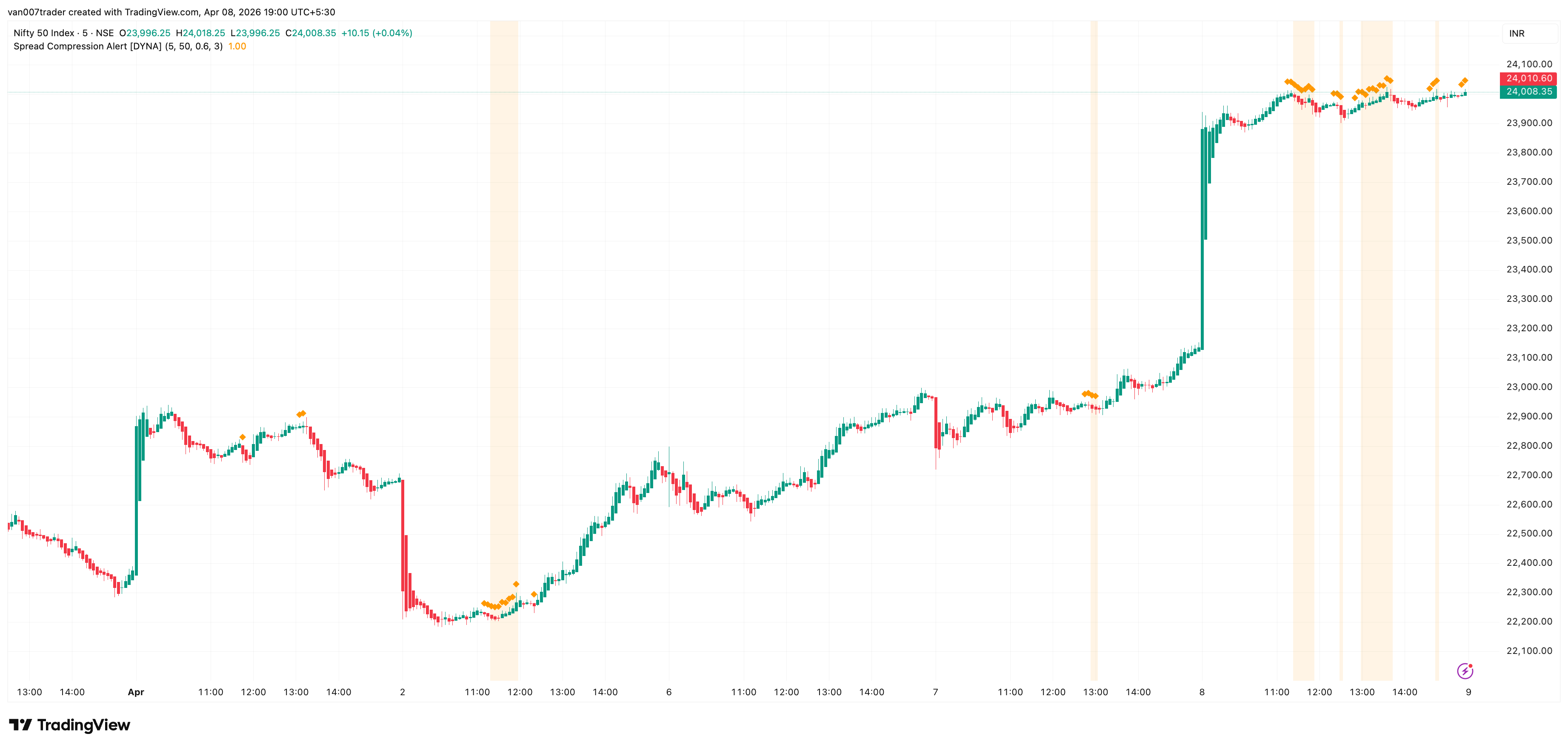
Markets don't move in straight lines — they alternate between periods of compression and expansion. Spread Compression Alert detects when candle ranges shrink to unusually low levels, warning you that a sharp move is building beneath the surface. Instead of reacting after a breakout has already happened, you can position yourself before it begins.
Most traders miss the quiet before the storm. They stare at flat price action and look away, only to catch the tail end of a big move. This indicator solves that problem by continuously comparing short-term volatility to its longer-term baseline and flagging the exact moments when the market is coiling tightest — right when you should be paying the most attention.
Key Features
- ATR Compression Ratio — Compares fast ATR to slow ATR to objectively measure how compressed current price action is relative to normal conditions
- Diamond Markers — Small orange diamonds appear above each compressed bar, giving you an instant visual scan of where the market is tightening
- Cluster Detection — When multiple consecutive bars are compressed, the background highlights orange, signaling that expansion pressure is building to extreme levels
- Confirmed-Bar Logic — All signals are calculated on confirmed (closed) bars, so markers never appear and disappear mid-bar
How It Works
As you watch a chart, you will notice small orange diamond markers appearing above certain bars. Each diamond indicates that the bar's range is significantly smaller than the recent average — the market is compressing. A single diamond is worth noting but not necessarily actionable.
When diamonds appear on several consecutive bars, the background turns a soft orange. This is the cluster highlight, and it tells you the market has been compressing for an extended period. Many traders study these clusters as periods of consolidation that can precede a range expansion. The longer the compression lasts, the more notable the eventual breakout in range can be.
Settings
The indicator works out of the box with sensible defaults. The Fast ATR Length (default 5) measures recent candle ranges, while the Slow ATR Length (default 50) establishes the normal volatility baseline. The Compression Ratio (default 0.6) sets how tight the range must get before flagging compression — lower values require more extreme compression. The Consecutive Bar Threshold (default 3) controls how many compressed bars in a row trigger the cluster highlight and extreme compression alert.
For lower timeframes like 1-5 minute charts, you may want to reduce the Slow ATR Length to 30 so the baseline adapts faster. For stricter signals on any timeframe, try lowering the Compression Ratio to 0.3.
Alerts
- Compression Detected — Fires when a single compressed bar is confirmed. Message: "Spread Compression Alert [DYNA]: Candle range compression detected. ATR ratio dropped below threshold — watch for expansion."
- Extreme Compression — Fires when consecutive compressed bars reach the threshold. Message: "Spread Compression Alert [DYNA]: Extreme compression — multiple consecutive compressed bars. Expansion is imminent."
To set up alerts: click the TradingView Alerts button, select "Spread Compression Alert [DYNA]" from the indicator dropdown, choose "Any alert() function call" as the condition, and set your preferred notification method.
Best Practices
- Compression tells you when a move is coming, not which direction. Pair this indicator with a trend or momentum tool for directional bias.
- Compression clusters near key support or resistance levels tend to produce the most tradeable breakouts.
- This indicator is especially useful before scheduled news events or market opens, when volatility is temporarily suppressed.
- On higher timeframes (4H, Daily), compression signals can indicate multi-day consolidation patterns worth monitoring for swing entries.
Part of the DYNA Ecosystem
Spread Compression Alert is a free indicator built with the same design standards as the DYNA premium suite. For complete trade management with automatic stop loss, break-even, trailing stops, and multi-target systems, explore the full DYNA indicator collection.
Disclaimer
This indicator is a technical analysis and educational tool only — it is not financial advice and makes no guarantee of any outcome. Past performance does not predict future results. Always do your own research and use proper position sizing and risk management.